The Avantree Oasis Plus 2 is our first shortlist choice for a TV with optical or AUX output; the Twelve South AirFly Pro 2 is the more practical travel choice; and the Creative BT-W6 is for supported USB audio devices. The best Bluetooth transmitter depends on where the audio comes from and which headphones receive it. A TV adapter, airplane adapter and car FM transmitter solve different problems.
Affiliate disclosure: As an Amazon Associate, we earn from qualifying purchases. Buying through our links may earn us a commission at no additional cost to you.
Product listings and manufacturer documentation checked: 3 November 2026. This is a research-based buying guide, not a hands-on group test. Prices, sellers and stock can change; use the Amazon buttons to check the current offer.
Best Bluetooth transmitters at a glance
Swipe to compare all columns on smaller screens.
| Our pick | Best fit | Audio input | Main reason to choose it | Check first |
|---|---|---|---|---|
| Avantree Oasis Plus 2 | TV listening | Optical / 3.5mm AUX | Remote volume control, two headphones and optical passthrough | No direct HDMI ARC/eARC; no Auracast |
| 1Mii B06TX | Simpler TV setup | Optical / coaxial / AUX / RCA | Multiple input choices without a receiver mode | aptX Low Latency must also be supported by headphones |
| Twelve South AirFly Pro 2 | Flights and shared travel listening | 3.5mm AUX in TX mode | Battery power and two-headphone pairing | Airline socket; codec compatibility |
| FiiO BTA30 Pro | Digital hi-fi sources | USB / optical / coaxial | LDAC transmission plus receiver and DAC modes | RCA is an output, not an analog input |
| 1Mii B03Pro | TV and older stereo in one system | Optical / AUX / RCA | Selectable TX/RX modes and bypass | Not simultaneous TX and RX; dual-link codec limits |
| Creative BT-W6 | PC, Mac and supported consoles | USB-C audio | aptX Adaptive and LE Audio options | Not a universal TV USB adapter or Xbox recommendation |
Fast choice: check the Oasis Plus 2 on Amazon for a compatible television, or check the AirFly Pro 2 for a seat-back screen. Before buying either, read the compatibility checklist below.
Check these three things before buying
- Your source output: look for optical OUT, a 3.5mm headphone OUT, coaxial digital OUT, or supported USB audio. An optical input or a USB port used only for power does not supply audio.
- Your headphone codecs: low delay depends on both ends of the wireless connection. An aptX Adaptive transmitter cannot give aptX Adaptive to headphones that do not support it.
- Your listening arrangement: one listener, two listeners, soundbar plus headphones and gaming with a microphone have different requirements. Confirm the exact combination, not just the Bluetooth version.
If you need the terminology first, our Bluetooth transmitter and receiver guide explains the difference.
1. Avantree Oasis Plus 2: our TV shortlist choice

The Oasis Plus 2 earns this position because it addresses the everyday TV tasks that matter: feeding one or two Bluetooth headphones, adjusting volume from the sofa and passing optical audio through to a compatible soundbar. Optical and AUX inputs cover two common television audio outputs. The remote is a more useful feature for this job than buying on a Bluetooth version number alone.
Avantree lists aptX Adaptive, aptX Low Latency, aptX and SBC support. That provides options, but the receiving headphones still determine which codec can actually be used. A supported codec is not a promise that every pair of earbuds will have the same delay.
- Choose it if: your TV has optical or AUX output and you want a dedicated living-room setup.
- Check before ordering: optical audio must be PCM stereo, rather than Dolby or DTS. Optical passthrough does not mean HDMI ARC passthrough.
- Skip it if: you need a battery-powered airplane adapter, direct HDMI-only connection or Auracast hearing-aid support.
Check Oasis Plus 2 price on Amazon
2. 1Mii B06TX: a straightforward TV alternative

The B06TX is worth comparing when you want to send a TV’s sound to headphones and do not need to receive music from a phone. Its listing includes optical, coaxial, AUX and RCA audio inputs, giving it a useful range of source connections. Coaxial can be especially helpful on equipment with a digital output that is not optical.
This is a transmitter, not a Bluetooth receiver for an old amplifier. The distinction is easy to miss in a shopping result full of similar boxes. It supports two connected headphones or speakers, but its low-latency claim depends on matching aptX Low Latency support at the receiving end.
- Choose it if: input flexibility matters more than having TX/RX switching.
- Check before ordering: identify an actual audio OUT port on your TV and confirm any cables you need are included.
- Trade-off: it is less versatile than a transceiver if you later want to stream your phone to a wired stereo.
3. Twelve South AirFly Pro 2: the travel choice

For flights, gym screens and other sources with a headphone jack, a small battery-powered adapter is easier to pack than a desktop TV box. The AirFly Pro 2 plugs into a 3.5mm audio output and can pair with two sets of Bluetooth headphones. Twelve South claims more than 25 hours of battery life; actual runtime depends on use.
It also has a receiver mode for sending phone audio into a wired AUX input, so it can serve a second purpose in a car or other compatible stereo. The Pro 2 supports a broader transmit codec selection than the original AirFly Pro, including aptX Adaptive and aptX Low Latency. Those advantages require compatible headphones; an AirPods connection does not inherit aptX simply because the transmitter offers it.
- Choose it if: portability and sharing seat-back audio are the main reasons for buying.
- Check before ordering: your airline may use a two-prong socket. Compare the standard and Deluxe bundle contents before buying an extra airline adapter.
- Trade-off: there is no optical TV input. For a permanent living-room installation, compare the TV models above.
Check AirFly Pro 2 price on Amazon
4. FiiO BTA30 Pro: for digital sources and LDAC
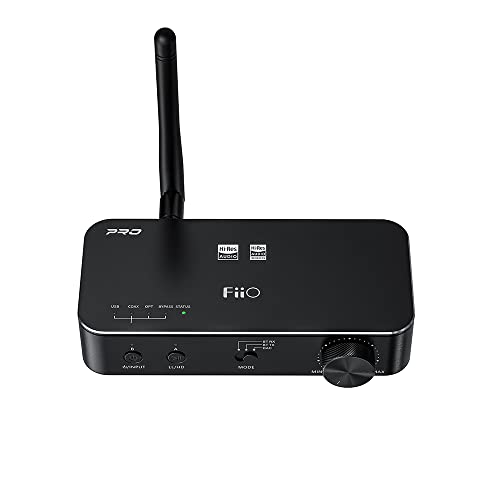
The BTA30 Pro is the specialist choice here. It can transmit Bluetooth audio from digital sources, receive Bluetooth into a wired system and function as a DAC. Its appeal is the connection and codec flexibility, especially LDAC transmission from USB, optical or coaxial input, rather than a simple plug-and-forget TV experience.
Do not mistake its RCA connectors for analog inputs: the RCA line connection is an output. That rules it out as a direct transmitter for an analog-only turntable or a TV with only a headphone jack. You also cannot use LDAC or aptX Low Latency while transmitting to two Bluetooth devices simultaneously, according to FiiO.
- Choose it if: you have a compatible digital source and headphones that can use LDAC, or you also need receiver/DAC functions.
- Check before ordering: whether your exact input and operating mode support the feature you want.
- Trade-off: its extra functions add complexity. Spending more will not improve an incompatible headphone’s codec support.
Check BTA30 Pro price on Amazon
5. 1Mii B03Pro: TX/RX flexibility for a home system

The B03Pro fits a different buyer from the B06TX: someone who wants a box that can switch between sending TV audio to headphones and receiving phone audio for a wired stereo. Its listing describes optical, AUX and RCA connections plus bypass for a wired speaker or soundbar while transmitting.
The important qualification is that these modes are selectable, not simultaneous: it cannot transmit and receive Bluetooth at the same time. The current listing also says that connecting two aptX Low Latency headphones switches the codec to standard aptX for stability. If two people watching dialogue in sync is the whole purpose, that limitation deserves attention before purchase.
- Choose it if: you need a transceiver and can match its documented modes to your system.
- Check before ordering: exact model revision and dual-headphone behavior. B03, B03Pro and similarly named adapters should not be treated as interchangeable.
- Trade-off: advertised long-range distances are not a guarantee through walls, furniture or interference.
6. Creative BT-W6: for supported USB audio devices

The BT-W6 takes digital audio from a compatible USB host rather than an optical or analog cable. Creative documents PC, Mac, PlayStation and Nintendo Switch support subject to its system requirements. It is a useful shortlist choice when you want a dedicated Bluetooth audio path and codec controls instead of relying on a computer’s built-in Bluetooth implementation.
Its classic Bluetooth options include aptX Adaptive and aptX Lossless; LE Audio uses LC3 and supports additional modes with compatible receivers. It does not support the older, separate aptX Low Latency codec. “Low latency” in an aptX Adaptive description should not be read as aptX LL compatibility.
- Choose it if: your host and headphones both meet the requirements for the intended mode.
- Check before ordering: USB audio support, current firmware and microphone behavior on your platform.
- Skip it if: your only connection is a television’s USB power port. Xbox is not listed among the supported platforms in the specifications checked.
Check Creative BT-W6 price on Amazon
Transmitter, receiver or car FM adapter?
Swipe to compare all columns on smaller screens.
| Your goal | What you need | Signal direction |
|---|---|---|
| TV or airplane screen to wireless headphones | Bluetooth transmitter | Audio output into adapter; Bluetooth out to headphones |
| Phone music into a wired amplifier or AUX car stereo | Bluetooth receiver | Bluetooth into adapter; cable out to stereo |
| Phone music into a car radio with no AUX input | Bluetooth-to-FM car adapter | Bluetooth from phone; FM signal into car radio |
| Bluetooth from a supported computer or console | USB audio transmitter | USB audio into adapter; Bluetooth out |
A model labelled TX/RX can usually do one role at a time. Do not buy a receiver-only adapter to connect wireless headphones to a television. Similarly, a car FM adapter is not a substitute for the headphone transmitters compared above.
How to choose a Bluetooth transmitter that will work
Start with the output port, not the brand
Look at the back of your TV or source and read the port labels. An RCA pair may be an input; an optical socket may be an input; USB may provide power without audio. A match in connector shape is not enough. HDMI-only equipment may need a suitable audio extractor, which adds another compatibility decision.
Treat codec matching as a requirement
SBC is a basic compatibility route, while aptX Low Latency, aptX Adaptive, LDAC and LE Audio serve different purposes. They are not interchangeable upgrades. A transmitter can only negotiate modes supported by the headphones. Higher bitrate and lower delay are also different goals; choose around your actual listening use.
Check what happens with two headphones
Dual pairing can change codec selection and delay. Do not assume a single-headphone performance claim survives when a second pair connects. If two people will use different headphone models, verify both and check the transmitter’s dual-link restrictions.
Plan soundbar and TV-speaker use
Optical passthrough may let a soundbar play alongside wireless headphones, but it does not guarantee the TV’s own speakers stay active. The TV’s audio settings still matter. An HDMI ARC soundbar also needs a different connection plan from an optical soundbar.
Do not pay for range you cannot use
Open-space range figures are useful comparisons, not a floor plan prediction. Walls, metal equipment and the receiving headphones can limit a connection. Position the transmitter away from obstructions and compare return arrangements if you need listening across several rooms.
TV setup and troubleshooting checklist
- Connect a supported audio OUT port to the correct transmitter IN port, then connect power.
- Select TX mode where applicable. Put both the transmitter and headphones into pairing mode.
- Temporarily disconnect the headphones from nearby phones or laptops if they keep reconnecting elsewhere.
- For the optical models covered here, select a compatible PCM/stereo TV output setting; check the model instructions.
- If there is no sound, verify the TV output selection, input selector, volume and cable direction.
- If the sound is delayed, check the negotiated codec and headphone support. Buying a second transmitter with the same incompatible codec will not solve that mismatch.
- Test one pair of headphones before adding the second, and recheck synchronization after both connect.
For TV-specific considerations, see our guide to Bluetooth speakers for TV. For headphones, note that the Soundcore Q20i loses ANC in wired AUX mode; a compatible transmitter enables Bluetooth listening, but does not guarantee low delay.
Frequently asked questions
What is the best Bluetooth transmitter for a TV?
The Oasis Plus 2 is our first shortlist choice for a TV with optical or AUX output and users who value a remote and optical passthrough. The right answer changes for HDMI-only TVs, Auracast receivers and headphones with different codec support.
Will a Bluetooth transmitter work with AirPods?
A compatible transmitter can pair with AirPods for listening from a wired audio source. That does not make AirPods support the transmitter’s aptX codecs. Check the exact adapter, AirPods model and intended source rather than assuming zero delay.
Is Bluetooth 5.4 better than Bluetooth 5.0 for TV audio?
The version number alone does not establish lip-sync performance. Supported audio codecs, headphone compatibility and operating mode are more useful buying criteria. A newer radio is not a substitute for matching the complete signal path.
Can I use one adapter for two wireless headphones?
Several picks support two headphones, but the behavior differs. Check whether the intended codec remains available with both connected. The BTA30 Pro’s LDAC and aptX LL restrictions and the B03Pro’s dual-link note are examples of why this matters.
Will plugging a transmitter into my TV’s USB port give it audio?
Only if the transmitter and TV support the required USB audio connection. Many TV adapters use USB just for power and need a separate optical or analog audio cable. Follow the exact model’s connection diagram.
Can I use a transmitter for gaming and voice chat?
Listening support does not establish microphone or chat support. Confirm your platform, headset, microphone path and adapter mode. For competitive gaming, a platform-approved wireless headset or wired connection may be a simpler choice.
Is LDAC lossless?
Do not interpret a hi-res or LDAC label as a blanket lossless guarantee. The FiiO’s LDAC capability is a reason to compare it with compatible digital sources and headphones, not evidence of lossless delivery in every setup.
What should I buy for a car?
If the car has AUX input and you want phone music, compare Bluetooth receivers or a transceiver’s RX mode. If it only has an FM radio, you need a car FM adapter. Neither task is the same as sending TV audio to Bluetooth headphones.
Which one should you buy?
For a compatible TV: start with the Oasis Plus 2. For flights: compare the AirFly Pro 2. For supported USB devices: consider the BT-W6. Choose the B06TX, B03Pro or BTA30 Pro when their particular inputs and modes solve a requirement the other models do not.
Before checkout, confirm the listing’s model, your source output and your headphones’ codecs. Those checks are more likely to produce a useful purchase than picking the adapter with the longest feature list.
Sources and how we selected these picks
We compared input types, TX/RX roles, headphone count, codec restrictions and setup requirements using manufacturer documentation and current Amazon Creators API listings. All six selected ASINs returned an available offer when checked. We have not measured latency, range, sound quality or battery endurance ourselves, and these are use-case recommendations rather than laboratory rankings.
- Avantree Oasis Plus 2 specifications and compatibility
- 1Mii B06TX connection FAQ
- Twelve South AirFly Pro 2 specifications
- Twelve South transmit and receive codec support
- FiiO BTA30 Pro operating modes and dual-link restrictions
- Creative BT-W6 supported platforms and specifications
- Creative BT-W6 codec comparison